Another one I have to keep rediscovering, so I decided to just document it and know where to look for it.
Trying to connect remotely to the MySQL instance of my Virtual Linux node I got the
"Host 'cpe-76-181-242-18.columbus.res.rr.com' is not allowed to connect to this MySQL server".
Solution was to log in to mysql as a root and create that particular user for that particular hostname:
mysql -u<yourRootId> -p<password>;
CREATE USER 'someuser'@'cpe-76-181-242-18.columbus.res.rr.com' IDENTIFIED BY 'some_P@ssw0rd';
GRANT ALL PRIVILEGES ON *.* TO 'someuser'@'cpe-76-181-242-18.columbus.res.rr.com';
In some cases you may have to also do
flush privileges;
for the changes to take effect.
Hope this helps someone. Cheers!
P.S. No worries, the hostnames are made up.
Tuesday, December 27, 2011

Tuesday, December 13, 2011
Spring + Quartz step-by-step
Update: 08/03/2016 - There is much easier way these days to quickly set up a scheduled process in your Java/Spring app - checkout the "@Scheduled" Spring annotation. The steps below could still be of help to you, if you are stuck with an older Spring version, which does not support the @Scheduled annotation.
I often end up spending prohibitive amount of time on tasks which I have completed in the past. One such task is setting up batch job with Spring and Quartz. Here is a step-by-step for my own sake or for anyone's else's sake:
The scenario is to have a job that periodically polls blogs for new blog entries. I assume a maven project.
1. Code up your job:
package com.qsi.template.util;
import java.net.URL;
import java.util.Arrays;
import com.sun.syndication.feed.synd.SyndEntry;
import com.sun.syndication.feed.synd.SyndFeed;
import com.sun.syndication.feed.synd.SyndEntryImpl;
import com.sun.syndication.io.SyndFeedInput;
import com.sun.syndication.io.XmlReader;
public class FeedReader {
String [] feedsUrls = new String [] { "http://boyko11.blogspot.com/feeds/posts/default" };
public void readFeeds() {
for (String feedUrlAsString: Arrays.asList(feedsUrls)) {
try {
URL feedUrl = new URL(feedUrlAsString);
SyndFeedInput input = new SyndFeedInput();
SyndFeed feed = input.build(new XmlReader(feedUrl));
SyndEntry mostRecentEntry = (SyndEntryImpl) feed.getEntries().get(0);
System.out.println("title: " + mostRecentEntry.getTitle());
System.out.println("author: " + mostRecentEntry.getAuthor());
System.out.println("date: " + mostRecentEntry.getPublishedDate());
System.out.println("link: " + mostRecentEntry.getLink());
}
catch (Exception ex) {
ex.printStackTrace();
System.out.println("ERROR: "+ex.getMessage());
}
}
}
}
I am using Rome for RSS reading :http://java.net/projects/rome/
2. Add dependencies to pom.xml
<dependency>
<groupId>org.opensymphony.quartz</groupId>
<artifactId>quartz</artifactId>
<version>${quartz.version}</version>
</dependency>
<dependency>
<groupId>org.springframework</groupId>
<artifactId>spring-context</artifactId>
<version>${spring.version}</version>
</dependency>
<dependency>
<groupId>org.springframework</groupId>
<artifactId>spring-context-support</artifactId>
<version>${spring.version}</version>
</dependency>
3. Add the job to your Spring config file(in my case applicationContext.xml)
<bean id="feedReader" class="com.qsi.template.util.FeedReader" />
<bean id="feedReaderJob" class="org.springframework.scheduling.quartz.MethodInvokingJobDetailFactoryBean">
<property name="targetObject" ref="feedReader" />
<property name="targetMethod" value="readFeeds" />
</bean>
4. Add a trigger to you Spring config file
<bean id="simpleTrigger" class="org.springframework.scheduling.quartz.SimpleTriggerBean">
<property name="jobDetail" ref="feedReaderJob" />
<property name="repeatInterval" value="10000" />
<property name="startDelay" value="3000" />
</bean>
This job will trigger 3 seconds after the app starts and will run every 10 seconds
5. Add Scheduler to your Spring config file
<bean class="org.springframework.scheduling.quartz.SchedulerFactoryBean">
<property name="jobDetails">
<list>
<ref bean="feedReaderJob" />
</list>
</property>
<property name="triggers">
<list>
<ref bean="simpleTrigger" />
</list>
</property>
</bean>
That should be it.
Credits:
http://www.mkyong.com/spring/spring-quartz-scheduler-example/
The mkyong example also has an example with the CronTriggerBean which might be more desirable to use in your actual production apps.
Hope this helps someone! Cheers!
Update: Since this example lacks context, I added an web app example:
web app example
Update: 12-11-2013: There's a better way to do a scheduled job these days. Use the @Scheduled annotation.
I often end up spending prohibitive amount of time on tasks which I have completed in the past. One such task is setting up batch job with Spring and Quartz. Here is a step-by-step for my own sake or for anyone's else's sake:
The scenario is to have a job that periodically polls blogs for new blog entries. I assume a maven project.
1. Code up your job:
package com.qsi.template.util;
import java.net.URL;
import java.util.Arrays;
import com.sun.syndication.feed.synd.SyndEntry;
import com.sun.syndication.feed.synd.SyndFeed;
import com.sun.syndication.feed.synd.SyndEntryImpl;
import com.sun.syndication.io.SyndFeedInput;
import com.sun.syndication.io.XmlReader;
public class FeedReader {
String [] feedsUrls = new String [] { "http://boyko11.blogspot.com/feeds/posts/default" };
public void readFeeds() {
for (String feedUrlAsString: Arrays.asList(feedsUrls)) {
try {
URL feedUrl = new URL(feedUrlAsString);
SyndFeedInput input = new SyndFeedInput();
SyndFeed feed = input.build(new XmlReader(feedUrl));
SyndEntry mostRecentEntry = (SyndEntryImpl) feed.getEntries().get(0);
System.out.println("title: " + mostRecentEntry.getTitle());
System.out.println("author: " + mostRecentEntry.getAuthor());
System.out.println("date: " + mostRecentEntry.getPublishedDate());
System.out.println("link: " + mostRecentEntry.getLink());
}
catch (Exception ex) {
ex.printStackTrace();
System.out.println("ERROR: "+ex.getMessage());
}
}
}
}
I am using Rome for RSS reading :http://java.net/projects/rome/
2. Add dependencies to pom.xml
<dependency>
<groupId>org.opensymphony.quartz</groupId>
<artifactId>quartz</artifactId>
<version>${quartz.version}</version>
</dependency>
<dependency>
<groupId>org.springframework</groupId>
<artifactId>spring-context</artifactId>
<version>${spring.version}</version>
</dependency>
<dependency>
<groupId>org.springframework</groupId>
<artifactId>spring-context-support</artifactId>
<version>${spring.version}</version>
</dependency>
3. Add the job to your Spring config file(in my case applicationContext.xml)
<bean id="feedReader" class="com.qsi.template.util.FeedReader" />
<bean id="feedReaderJob" class="org.springframework.scheduling.quartz.MethodInvokingJobDetailFactoryBean">
<property name="targetObject" ref="feedReader" />
<property name="targetMethod" value="readFeeds" />
</bean>
4. Add a trigger to you Spring config file
<bean id="simpleTrigger" class="org.springframework.scheduling.quartz.SimpleTriggerBean">
<property name="jobDetail" ref="feedReaderJob" />
<property name="repeatInterval" value="10000" />
<property name="startDelay" value="3000" />
</bean>
This job will trigger 3 seconds after the app starts and will run every 10 seconds
5. Add Scheduler to your Spring config file
<bean class="org.springframework.scheduling.quartz.SchedulerFactoryBean">
<property name="jobDetails">
<list>
<ref bean="feedReaderJob" />
</list>
</property>
<property name="triggers">
<list>
<ref bean="simpleTrigger" />
</list>
</property>
</bean>
That should be it.
Credits:
http://www.mkyong.com/spring/spring-quartz-scheduler-example/
The mkyong example also has an example with the CronTriggerBean which might be more desirable to use in your actual production apps.
Hope this helps someone! Cheers!
Update: Since this example lacks context, I added an web app example:
web app example
Update: 12-11-2013: There's a better way to do a scheduled job these days. Use the @Scheduled annotation.
Sunday, October 9, 2011
Spring Roo Addon Create minor issues
As a part of a code template effort, I sat out to create a Hello World Spring Roo addon. I was happy to see that Spring docs had a step-by-step instructions at http://static.springsource.org/spring-roo/reference/html-single/index.html#simple-addons
I started following and here are some bumps I ran into that other people on the same mission later may run into as well
1. When running svn commands against your google code repo,
I got this
svn: Commit failed (details follow):
svn: MKACTIVITY of '/svn/!svn/act/c11bc650-0dcf-0144-a1a3-76f951a87324': authorization failed: Could not authenticate to server: rejected Basic challenge
It turns out, the password for the svn repo is not your gmail password.
To find out your google code password,
Login to your gmail account,
go to http://code.google.com/u/<your gmail id>
click on settings and you should see your google code password
2. When running mvn clean install it asked for a GPG Passphrase - here is what to do about that:
donwload gpg
http://www.gpg4win.org/download.html
After the msi installer finishes,
Use Kleopatra to create a New Certificate and a Passphrase
Start Kleoptara -> New -> Create New Certificate -> follow along,
I tried running mvn clean install and this time it complained
'gpg.exe' is not recognized as an internal or external command,
operable program or batch file.
So,
Add gpg to the PATH,
in my case PGP was installed to C:\Program Files\GNU\GnuPG
so I added C:\Program Files\GNU\GnuPG to the PATH Environment variable
and everything should be fine and dandy after that.
Hope this helps someone!
I started following and here are some bumps I ran into that other people on the same mission later may run into as well
1. When running svn commands against your google code repo,
I got this
svn: Commit failed (details follow):
svn: MKACTIVITY of '/svn/!svn/act/c11bc650-0dcf-0144-a1a3-76f951a87324': authorization failed: Could not authenticate to server: rejected Basic challenge
It turns out, the password for the svn repo is not your gmail password.
To find out your google code password,
Login to your gmail account,
go to http://code.google.com/u/<your gmail id>
click on settings and you should see your google code password
2. When running mvn clean install it asked for a GPG Passphrase - here is what to do about that:
donwload gpg
http://www.gpg4win.org/download.html
After the msi installer finishes,
Use Kleopatra to create a New Certificate and a Passphrase
Start Kleoptara -> New -> Create New Certificate -> follow along,
I tried running mvn clean install and this time it complained
'gpg.exe' is not recognized as an internal or external command,
operable program or batch file.
So,
Add gpg to the PATH,
in my case PGP was installed to C:\Program Files\GNU\GnuPG
so I added C:\Program Files\GNU\GnuPG to the PATH Environment variable
and everything should be fine and dandy after that.
Hope this helps someone!
Monday, July 18, 2011
Postfix Seen (Read mail) Flag
To the billions of developers trying to migrate Postfix to a database email solutions:
Q: How does Postfx mark a mail message as "Seen" (the email has been read)?
A: It appends ",S" to the name of the email message file on the file system.
If you just try to parse the postfix mail file into a javax.mail.Message by doing something along the lines of:
MimeMessage message = new MimeMessage(Session.getDefaultInstance(new Properties()), FileUtils.openInputStream(email));
and then try to see if the message was read or not, by calling:
message.isSet(Flags.Flag.SEEN)
isSet(Flags.Flag.SEEN) will always return false,
since you are not retrieving the message through Postfix.
The way I got around to determining if the message was read or not:
emailFile.getName().endsWith(",S") - true: read; false - NOT read.
Hope this helps someone!
Credit to the best DBA around: Charles Estel aka CJ!
Q: How does Postfx mark a mail message as "Seen" (the email has been read)?
A: It appends ",S" to the name of the email message file on the file system.
If you just try to parse the postfix mail file into a javax.mail.Message by doing something along the lines of:
MimeMessage message = new MimeMessage(Session.getDefaultInstance(new Properties()), FileUtils.openInputStream(email));
and then try to see if the message was read or not, by calling:
message.isSet(Flags.Flag.SEEN)
isSet(Flags.Flag.SEEN) will always return false,
since you are not retrieving the message through Postfix.
The way I got around to determining if the message was read or not:
emailFile.getName().endsWith(",S") - true: read; false - NOT read.
Hope this helps someone!
Credit to the best DBA around: Charles Estel aka CJ!
Thursday, July 7, 2011
Latest quote
Reading "HTML5: Up and Running" by Google's Mark Pilgrim.
Here is a quote of the the day:
"The
Here is a quote of the the day:
"The
canPlayType() function doesn’t return true or false. In recognition of how complex video formats are, the function returns a string:"probably"if the browser is fairly confident it can play this format"maybe"if the browser thinks it might be able to play this format""(an empty string) if the browser is certain it can’t play this format "
My response to this:
"Since when John Madden is involved with developing the HTML5 API???" :D
Excellent read so far though...
Friday, June 10, 2011
Reverse Engineer Hibernate Entities from a DB
I may make a use of this on a current object, so I had to google around and this is what I camep up with.
1. Install hibenate-tools for eclipse
Eclipse -> Help -> Install New Software -> Add
Location: hibernate-tools
Site: http://download.jboss.org/jbosstools/updates/stable/helios
 \
\
OK -> Expand Data Services and select Hibernate Tools

-> Next -> Restart at the prompt.
Create new Java Project with three source folders
-src
-config
-lib
Import the mysql-driver jar to the lib folder and add it to the classpath (in my case mysql-connector-java-5.1.13-bin.jar)

Select the config folder -> File ->New -> Other -> Hibernate Configuration File -> Next -> Next
Fill out the Dialect, the Driver class, the Connection URL, the username and password,
Check Create a console Configuration -> Next

Select the Annotations radio-button

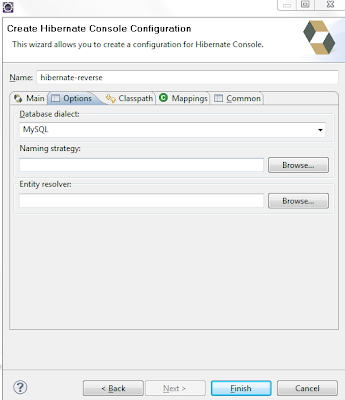
Select the options tag, Select MySQL from the Database Dialect drop-down -> Finish
File -> New -> Other -> Hibernate -> Hibernate Reverse Engineering File -> Next -> Next
Select the console configuration you created in the previous step from the
'Console Configuration' drop-down (in my case hibernate reverse) -> Hit the Refresh button bottom left -> Select the Database Schema from the left -> Hit Include

Finish. You should see two new files in your config folder:

Finally, you want to switch to Hibernate perspective:
Window -> Open Perspective -> Other ->Hibernate
Run ->Hibernate Code Generation -> Hibernate Code Generation Configurations ->
Double click Hibernate Code Generation ->
Select the Console Configuration from the drop-down ->
Select the Output directory as the src dir on the project ->
Select Reverse Engineer from JDBC Connection

Select the Exporters Tab -> Select Both Use Java 5 Syntax and EJB 3 annotations ->
Put a check in Domain Code(.java) -> Apply -> Run

And...BOOM...Now under the src folder you should see a 'default package' with all of your entities:

1. Install hibenate-tools for eclipse
Eclipse -> Help -> Install New Software -> Add
Location: hibernate-tools
Site: http://download.jboss.org/jbosstools/updates/stable/helios
 \
\OK -> Expand Data Services and select Hibernate Tools

-> Next -> Restart at the prompt.
Create new Java Project with three source folders
-src
-config
-lib
Import the mysql-driver jar to the lib folder and add it to the classpath (in my case mysql-connector-java-5.1.13-bin.jar)
Select the config folder -> File ->New -> Other -> Hibernate Configuration File -> Next -> Next
Fill out the Dialect, the Driver class, the Connection URL, the username and password,
Check Create a console Configuration -> Next

Select the Annotations radio-button

Select the options tag, Select MySQL from the Database Dialect drop-down -> Finish

File -> New -> Other -> Hibernate -> Hibernate Reverse Engineering File -> Next -> Next
Select the console configuration you created in the previous step from the
'Console Configuration' drop-down (in my case hibernate reverse) -> Hit the Refresh button bottom left -> Select the Database Schema from the left -> Hit Include

Finish. You should see two new files in your config folder:
Finally, you want to switch to Hibernate perspective:
Window -> Open Perspective -> Other ->Hibernate
Run ->Hibernate Code Generation -> Hibernate Code Generation Configurations ->
Double click Hibernate Code Generation ->
Select the Console Configuration from the drop-down ->
Select the Output directory as the src dir on the project ->
Select Reverse Engineer from JDBC Connection

Select the Exporters Tab -> Select Both Use Java 5 Syntax and EJB 3 annotations ->
Put a check in Domain Code(.java) -> Apply -> Run

And...BOOM...Now under the src folder you should see a 'default package' with all of your entities:

Sunday, May 22, 2011
My Cloudfoundry experience
I finally decided to follow up on my "Congratulations, You have been signed up with Cloudfoundry" email and see if I can go flying in the cloud. I looked at the help doc and started following along.
You'd have to install ruby and ruby gems, unless you opt for the STS plugin. The Cloudfoundry's deploy tool vmc is a gem so the first thing I did was "gem install vmc" as per the help doc.
After that I went on to deploying my hello world grails app. Attached is a screen shot of my dos session:

And sure enough the world's best online donkeys supermarket can be found at:
http://onlinedonkeys.cloudfoundry.com
I didn't have to install a database, I didn't have to write code to talk to a proprietary data source (hint, hint...GAE). It all just magically worked. Thumbs up!
I like the fact that it gives you three options for database - MongoDB and redis besides MySQL.
It also automatically detected that I wanted to deploy a Grails app.
You can also deploy Rails, Node, Sinatra, Spring Roo and JavaWeb.
Happy clouding!
You'd have to install ruby and ruby gems, unless you opt for the STS plugin. The Cloudfoundry's deploy tool vmc is a gem so the first thing I did was "gem install vmc" as per the help doc.
After that I went on to deploying my hello world grails app. Attached is a screen shot of my dos session:

And sure enough the world's best online donkeys supermarket can be found at:
http://onlinedonkeys.cloudfoundry.com
I didn't have to install a database, I didn't have to write code to talk to a proprietary data source (hint, hint...GAE). It all just magically worked. Thumbs up!
I like the fact that it gives you three options for database - MongoDB and redis besides MySQL.
It also automatically detected that I wanted to deploy a Grails app.
You can also deploy Rails, Node, Sinatra, Spring Roo and JavaWeb.
Happy clouding!
Subscribe to:
Posts (Atom)