Monday, April 25, 2022

Loki returns no data, although there is data

 In a multi-tenant system, You'd have to specify the org-id as "undefined", or no data will come back:

    logcli --org-id="undefined" query '{your_label="your_label_value"}'


If you are using the HTTP API, you'd have to set the

X-Scope-OrgID header to "undefined". Screenshot from my Chrome's ModHeader:


Credit: Tyler Owen


Loki logcli Error response from server: no org id

Problem:

On my Mac:

    export LOKI_ADDR=the_url_of_the_loki_server 

    logcli labels

    Error response from server: no org id


Solution:

    logcli --org-id="the_tenant_id_in_a_multitenant_system" labels

Wednesday, October 18, 2017

    I found myself in a situation where the same exact query ran much slower in our MySQL replication(slave) node compared to the primary(master) node. Both nodes had identical configuration, both were running the same version of MySQL, the tables and the indexes which the query ran against were also identical. Running explain through MySQL Workbench told me that the index that was making the query fast on the primary node, was not being used by the optimizer on the replica node. Hinting the query to use that particular index did improve the query speed on the replica node. But why did I have to hint? I knew with certainty there was a similar performance discrepancy for at least two other queries in my app.
    Jared Call, a colleague of mine, found that there was hung query on the replica node, by running
show processlist . The query was running for a number of days. He proceeded to kill the query:
https://stackoverflow.com/a/3787661/2948202
As soon as I learned about this, I ran my query against the replica, hoping that my problem would have been solved. Indeed, the query ran 5 seconds faster, but it was still slow - it took close to 7 seconds, while it was only a second on the primary node.
    Next Day: I tried on the replica node again and BOOM!!! - the query ran just as fast on replica as it ran on the primary. My guess is that this hung long running query was preventing any new records from being indexed, which made the query optimizer...not optimal. Once the hung query died, MySQL started indexing again and eventually caught up. This is my hand wavy theory as I am not a db admin pro.
   Tl;DR - if you have a query that MySQL doesn't seem to optimize correctly, check for any hung queries and kill them(as long as you know what you are doing). Then sit back and relax while MySQL catches up indexing.

Credits: Jared Call, Kelly Shutt, Eric Griffin, Nathan Wakefield, stackoverflow.com

Friday, March 28, 2014

Set a private field on a class you need to Unit Test

Well, of course, you could make your field with default access, or you can add some boilerplate setter, or you could fancy whipping up a utility using reflection, but spring-test has already thought of that.

Let's say you want to test your DonkeyController:

This is how you can easily set the private field donkeyDAO, without changes in the class under test:

ReflectionTestUtils is in spring-test:

Cheers!

Saturday, January 25, 2014

Spring MVC Json Rest Service Authentication Example

Just a quick example of using simple username/password authentication for a Spring RestTemplate Client-> Spring MVC Rest JSON service.

The idea is:
  1. Client fires a http request using Spring's RestTemplate
  2. The request is intercepted on the client side by Spring's ClientHttpRequestInterceptor
  3. The interceptor adds authentication headers to the http request before passing it on to the server
  4. The server side has a javax.servlet.Filter which looks at the request headers
  5. If the filter finds the headers injected by the client's interceptor and the header's values are correct (username/password correct) - the filter passes the request onto the server side logic for regular processing (chain.doFilter)
  6. If the Filter does not find the http headers or they have incorrect values, the filter writes "Unauthorized" to the http response.
I run it in tomcat through eclipse. To fire the requests through the client,  I just run the client(com.app.client.RestDonkeyClient)  within the same project by right-clinking on it and 'Run As -> Java Application. Both, service and client are in the same project for convenience.

https://github.com/boyko11/spring-rest-authenticate

References:
http://www.jeenisoftware.com/spring-3-mvc-json-example/
http://svenfila.wordpress.com/2012/01/05/resttemplate-with-custom-http-headers/


Saturday, December 7, 2013

Java Web App with Spring annotations, programmatic web.xml, programmatic application context and a scheduler

Create a new Maven Project with Eclipse

Make sure to flip the packaging to war


Add the following dependencies to your pom


Create the programmatic web.xml. I called mine WebInit.java(you can call it anything you want)
and stuck it in a package called "conf" under src/main/java

I also created a index.html file just to make sure I can deploy the app at this point and that WebInit kicks in.

Create the programmatic Spring Application Context. I did mine under the same "conf" package and called it SpringAppContext(you can call it anything you want)


Now we have to nudge Spring at app start-up and tell it to start wiring things up - creating beans, injecting and stuff (this is very technical language...thank you!)
So we add the following magic to the programmatic web.xml(WebInit.java in my case):


At this point we redeploy to test:
Search for "testBean" in the console - should be on line indicating it was instantiated by Spring - if that is the case, life is good!

INFO: Pre-instantiating singletons in org.springframework.beans.factory.support.DefaultListableBeanFactory@7baa3dd: defining beans [org.springframework.context.annotation.internalConfigurationAnnotationProcessor,org.springframework.context.annotation.internalAutowiredAnnotationProcessor,org.springframework.context.annotation.internalRequiredAnnotationProcessor,org.springframework.context.annotation.internalCommonAnnotationProcessor,springAppContext,org.springframework.context.annotation.ConfigurationClassPostProcessor.importAwareProcessor,testBean]; root of factory hierarchy
Dec 07, 2013 8:14:47 PM org.springframework.web.context.ContextLoader initWebApplicationContext
INFO: Root WebApplicationContext: initialization completed in 423 ms

Now we do some coding

We create a Service class that would be invoked to do some work from the scheduled job


Then we create the Scheduled Job and Autowire the Service into it:


Now we just have to tell Spring where to look for "@Component"s and also that we want to do scheduling stuff,
so we add these two to our SpringAppContext.java:

@EnableScheduling
@ComponentScan(basePackages= {"app"})

"app" is just the name of my base package. For you it would be whatever package you placed your "@Component"s at.

This what the final version of the SpringAppContext.java looks like:


At this point we can deploy and test the complete web app.


And here is a zip of the project: webapp-scheduled

Hope this is useful!

Sunday, September 9, 2012

Simple Spring Quartz Web App with Maven and Eclipse

Update: 08/03/2016 - There is much easier way these days to quickly set up a scheduled process in your Java/Spring app - checkout the "@Scheduled" Spring annotation. The steps below could still be of help to you, if you are stuck with an older Spring version, which does not support the @Scheduled annotation.

1. Create a Maven Web App project with Eclipse

File -> New -> Project -> Other -> Maven Project ->


Next -> Next ->

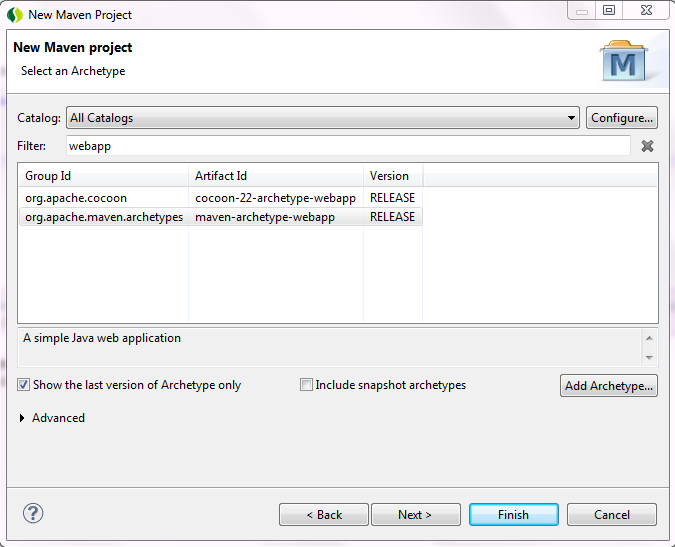
You should be at the Select Archtype Screen.


Type "webapp" (without the quotes) in the "filter" textbox.
Select the archtype with group Id: org.apache.maven.archtypes
and artifact id: maven-archtype-webapp.

Next -> Type whatever floats your boat for you Group Id and Artifact Id on the next screen:


-> Finish

2. Add needed dependencies to pom.xml. 


You are going to need all the listed dependencies, here is my pom:

<project xmlns="http://maven.apache.org/POM/4.0.0" xmlns:xsi="http://www.w3.org/2001/XMLSchema-instance"
  xsi:schemaLocation="http://maven.apache.org/POM/4.0.0 http://maven.apache.org/maven-v4_0_0.xsd">
  <modelVersion>4.0.0</modelVersion>
  <groupId>boyko</groupId>
  <artifactId>batch-example</artifactId>
  <packaging>war</packaging>
  <version>0.0.1-SNAPSHOT</version>
  <name>batch-example Maven Webapp</name>
  <url>http://maven.apache.org</url>
<dependencies>
<dependency>
<groupId>org.opensymphony.quartz</groupId>
<artifactId>quartz</artifactId>
<version>1.6.1</version>
</dependency>
<dependency>
<groupId>org.springframework</groupId>
<artifactId>spring-context</artifactId>
<version>3.1.1.RELEASE</version>
</dependency>
<dependency>
<groupId>org.springframework</groupId>
<artifactId>spring-context-support</artifactId>
<version>3.1.1.RELEASE</version>
</dependency>
<dependency>
<groupId>org.springframework</groupId>
<artifactId>spring-web</artifactId>
<version>3.1.1.RELEASE</version>
</dependency>
<dependency>
<groupId>org.springframework</groupId>
<artifactId>spring-tx</artifactId>
<version>3.1.1.RELEASE</version>
</dependency>
      <dependency>
          <groupId>commons-collections</groupId>
          <artifactId>commons-collections</artifactId>
          <version>3.2.1</version>
      </dependency>
</dependencies>
  <build>
    <finalName>batch-example</finalName>
  </build>
</project>

3. Add Spring to your web app.

Add Spring's ContextLoaderListener and the contextConfigLocation to web.xml.


This is my web.xml:

<!DOCTYPE web-app PUBLIC
 "-//Sun Microsystems, Inc.//DTD Web Application 2.3//EN"
 "http://java.sun.com/dtd/web-app_2_3.dtd" >

<web-app>
  <display-name>Archetype Created Web Application</display-name>

<context-param>
<param-name>contextConfigLocation</param-name>
<param-value>classpath:applicationContext.xml</param-value>
</context-param>

<listener>
<listener-class>org.springframework.web.context.ContextLoaderListener</listener-class>
</listener>

</web-app>

4. Create applicationContext.xml under src/main/resources

Right click on the project -> New -> Other -> XML file


5. Create src/main/java source folder

Right click on the project -> New -> Other -> Source Folder

6. Create the job

   Create a package under src/main/java
 
   Create a class that would be your Spring Batch job.


   Here is what mine looks like:
    

package boyko;

import java.text.DateFormat;
import java.text.SimpleDateFormat;

public class SampleJob {

public void sampleJobMethod() {

DateFormat dateFormat = new SimpleDateFormat("dd/MM/yyyy hh:mm:ss");

System.out.println("Invoked on " + dateFormat.format(System.currentTimeMillis()));
}
}


7. Add all needed configuration in applicationContext.xml

The final version of my specific applicationContext.xml is at the end of this section, but here are the additions step-by-step

7.1. Add the Job

<bean id="sampleJob" class="boyko.SampleJob" />

7.2. Create a Job Spring Quartz Bean and associate it with the Job and the Job method


<bean id="sampleJobBean"
class="org.springframework.scheduling.quartz.MethodInvokingJobDetailFactoryBean">
<property name="targetObject" ref="sampleJob" />
<property name="targetMethod" value="sampleJobMethod" />
</bean>

7.3. Create a trigger

<bean id="sampleJobTrigger" class="org.springframework.scheduling.quartz.SimpleTriggerBean">
<property name="jobDetail" ref="sampleJobBean" />
<property name="repeatInterval" value="10000" />
<property name="startDelay" value="3000" />
</bean>

7.4. Create a scheduler and associate it with the Job Bean and the Trigger

<bean class="org.springframework.scheduling.quartz.SchedulerFactoryBean">
<property name="jobDetails">
<list>
<ref bean="sampleJobBean" />
</list>
</property>
<property name="triggers">
<list>
<ref bean="sampleJobTrigger" />
</list>
</property>
</bean>

The numbers in trigger mean that the job will run for first time 3 seconds after app starts, then it will run every 10 seconds.

Here is the entire applicationContext.xml:

<?xml version="1.0" encoding="UTF-8"?>
<beans xmlns="http://www.springframework.org/schema/beans"
xmlns:xsi="http://www.w3.org/2001/XMLSchema-instance"
xsi:schemaLocation="http://www.springframework.org/schema/beans http://www.springframework.org/schema/beans/spring-beans-3.1.xsd">

<bean id="sampleJob" class="boyko.SampleJob" />

<bean id="sampleJobBean"
class="org.springframework.scheduling.quartz.MethodInvokingJobDetailFactoryBean">
<property name="targetObject" ref="sampleJob" />
<property name="targetMethod" value="sampleJobMethod" />
</bean>

<bean id="sampleJobTrigger" class="org.springframework.scheduling.quartz.SimpleTriggerBean">
<property name="jobDetail" ref="sampleJobBean" />
<property name="repeatInterval" value="10000" />
<property name="startDelay" value="3000" />
</bean>

<bean class="org.springframework.scheduling.quartz.SchedulerFactoryBean">
<property name="jobDetails">
<list>
<ref bean="sampleJobBean" />
</list>
</property>
<property name="triggers">
<list>
<ref bean="sampleJobTrigger" />
</list>
</property>
</bean>

</beans>

That should be that.

Run it on whatever server you prefer( I run on Tomcat 7 - right click on project -> Run On Server -> Tomcat 7) and you should see the sysouts in the console:


Attached is the sample. You could import it as an eclipse project after you unzip it and give a try on your own.

boyko-spring-batch-example

And here is an identical example which uses Cron Trigger and JobDetailBean:

boyko-cron-jobDetailBean-example


Update:12-11-2013: There's a better way to do a scheduled job these days. Use the @Scheduled annotation.

Friday, May 11, 2012

Working on one of our Grails apps I got "could not execute query; SQL [select contrac0_.contract_hrs as col_0_0_ from contract contrac0_ ]; nested exception is org.hibernate.exception.SQLGrammarException: could not execute query". I got the exception while running an integration test against the Service class executing the above query.
Farther down the stack there was also "Caused by: java.sql.SQLException: Table not found in statement [select top ? contrac1_.contract_hrs as col_0_0_ from contract contract0_]"

We are using Oracle and the specific domain class had a field defined as Double, but it also had 'sqlType' for the field specified as 'NUMBER(7,2)' to match up with the DDL for the table and to get around the dbCreate set to validate in our DataSource.groovy.

class Contract {
      Double contract_hrs

    static mapping ={
        contract_hrs column: "contract_hours", sqlType: "NUMBER(7,2)"
    }
}

To take care of the test, we had to take out the sqlType out.

Fixing the test this way though, made the application not run. At application startup we started getting an error message saying something along the lines of "expected double, but found integer" for the the contract_hours field(column).

The way to get around that was to change the dbCreate in DataSource.groovy from "validate" to "none".

Hope this helps someone!

Tuesday, April 3, 2012

zip by latitude and longitude with geonames and groovy

The titles says it. Geonames is publicly available RESTful web services provider. One of the services is findNearbyPostalCodesJSON. You give it a latitude and longitude and it gives you back a list of zip codes in JSON format. Try it for my neck of the woods:
 http://ws.geonames.org/findNearbyPostalCodesJSON?formatted=true&lat=39.998&lng=-82.8841

The gotcha is that you can make only up to 2000 service calls per day, after that you are asked to pay and service does not give you back your so desired zip codes.

And here is how we can do it with groovy and HTTPBuilder. You are going to need the following dependencies, assuming a maven project:


<dependency>
<groupId>commons-cli</groupId>
<artifactId>commons-cli</artifactId>
<version>1.1</version>
</dependency>
<dependency>
  <groupId>org.codehaus.groovy.modules.http-builder</groupId>
  <artifactId>http-builder</artifactId>
  <version>0.5.2</version>
</dependency>


And the code:

def http = new HTTPBuilder( 'http://ws.geonames.org' )
http.request( GET, JSON ) {
uri.path = '/findNearbyPostalCodesJSON'
uri.query = [ formatted: true, lat: 39.998, lng: -82.8841 ]
response.success = { resp, json ->
   
   println json
   return json.postalCodes[0].postalCode
 }
 response.failure = { resp ->
 
   log.error("Unexpected error: ${resp.status} : ${resp.statusLine.reasonPhrase}")
   return ""
 }

Hope this is helpful to someone some day.

Cheers!

Sunday, January 8, 2012

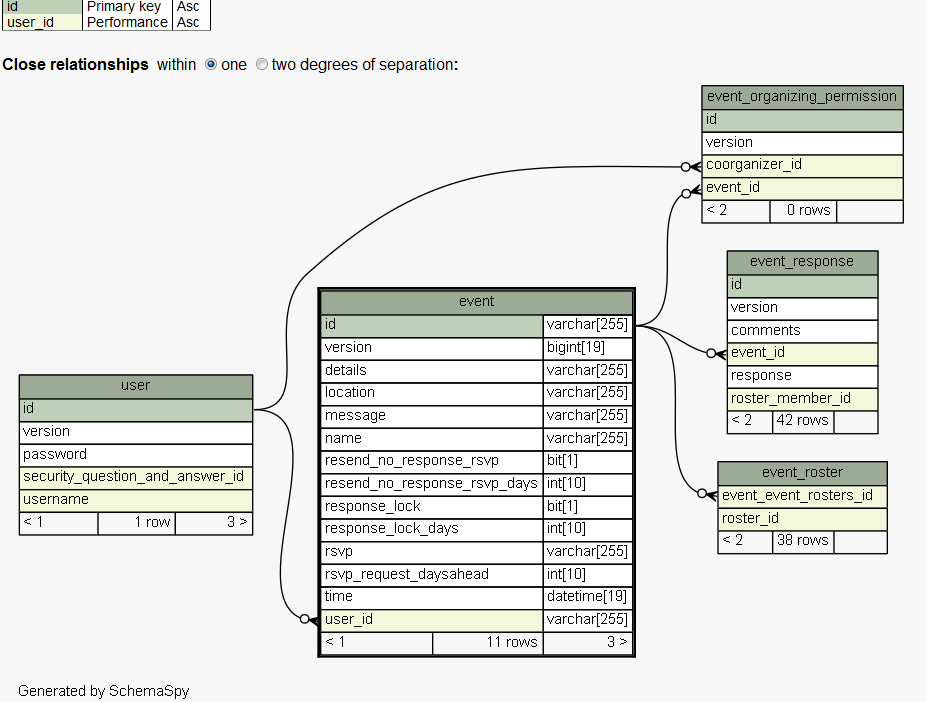
Set up ShemaSpy

There shouldn't be any argument that understanding data in your application is important. One tool I have found incredibly valuable in helping me understand database relationships is ShemaSpy. There was already a Hudson job set up on project when I rolled in, so I wouldn't credit myself with discovering SchemaSpy(I guess the credit should go to Paul Mazak), but assuming you already have JAVA installed on your Windows machine to set up SchemaSpy:

1. Download the latest SchemaSpy jar:
http://sourceforge.net/projects/schemaspy/files/

In my case the jar was schemaSpy_5.0.0.jar I saved it as C:\SchemaSpy\schemaSpy_5.0.0.jar

2. Download the latest version of graphviz
http://www.graphviz.org/Download.php

It looks like this one only comes with a msi installer. I'm pretty sure they had a binary at one point, but no longer the case, I guess..

In my case I installed GraphViz to C:\GraphViz_2.28

3. Ensure GraphViz was added to the PATH Environment System variable

In my case the msi installer did append C:\Graphviz_2.28\bin to the PATH

5. Copy to the SchemaSpy directory any jars with the driver that you'd need to connect to your database of choice


In my case since I am going against MySQL so I placed the mysql-connector-java-5.1.13-bin.jar in  C:\SchemaSpy

6. Run SchemaSpy
    Open command prompt and cd to the directory of the SchemaSpy jar
    Run:

java -jar schemaSpy_5.0.0.jar -dp mysql-connector-java-5.1.13-bin.jar -gv "C:\Graphviz_2.28" -hq -t mysql -db my_database_name -host localhost -u my_username -p my_password -o C:\SchemaSpy

7. Open and enjoy the generated graphics

Go to the directory you specified with the -o option of the previous command.
There should be an index.html file there, click on it and ...voila you have graphical representation of your database and its relationships.


Hope this helps someone!


Tuesday, December 27, 2011

Host 'somehost' is not allowed to connect to this MySQL server

Another one I have to keep rediscovering, so I decided to just document it and know where to look for it.
Trying to connect remotely to the MySQL instance of my Virtual Linux node I got the
"Host 'cpe-76-181-242-18.columbus.res.rr.com' is not allowed to connect to this MySQL server".

Solution was to log in to mysql as a root and create that particular user for that particular hostname:

mysql -u<yourRootId> -p<password>;


CREATE USER 'someuser'@'cpe-76-181-242-18.columbus.res.rr.com' IDENTIFIED BY 'some_P@ssw0rd';
GRANT ALL PRIVILEGES ON *.* TO 'someuser'@'cpe-76-181-242-18.columbus.res.rr.com';

In some cases you may have to also do

flush privileges;


for the changes to take effect.

Hope this helps someone. Cheers!

P.S. No worries, the hostnames are made up.

Tuesday, December 13, 2011

Spring + Quartz step-by-step

Update: 08/03/2016 - There is much easier way these days to quickly set up a scheduled process in your Java/Spring app - checkout the "@Scheduled" Spring annotation. The steps below could still be of help to you, if you are stuck with an older Spring version, which does not support the @Scheduled annotation.

I often end up spending prohibitive amount of time on tasks which I have completed in the past. One such task is setting up batch job with Spring and Quartz. Here is a step-by-step for my own sake or for anyone's else's sake:
The scenario is to have a job that periodically polls blogs for new blog entries. I assume a maven project.

1. Code up your job:

package com.qsi.template.util;


import java.net.URL;
import java.util.Arrays;

import com.sun.syndication.feed.synd.SyndEntry;
import com.sun.syndication.feed.synd.SyndFeed;
import com.sun.syndication.feed.synd.SyndEntryImpl;
import com.sun.syndication.io.SyndFeedInput;
import com.sun.syndication.io.XmlReader;

public class FeedReader {
String [] feedsUrls = new String [] { "http://boyko11.blogspot.com/feeds/posts/default" };
    public void readFeeds() {
    for (String feedUrlAsString: Arrays.asList(feedsUrls)) {
       try {
           URL feedUrl = new URL(feedUrlAsString);
           SyndFeedInput input = new SyndFeedInput();
           SyndFeed feed = input.build(new XmlReader(feedUrl));
           SyndEntry mostRecentEntry = (SyndEntryImpl) feed.getEntries().get(0);
           System.out.println("title: " + mostRecentEntry.getTitle());
           System.out.println("author: " + mostRecentEntry.getAuthor());
           System.out.println("date: " +  mostRecentEntry.getPublishedDate());
           System.out.println("link: " + mostRecentEntry.getLink());
       }
       catch (Exception ex) {
           ex.printStackTrace();
           System.out.println("ERROR: "+ex.getMessage());
       }
   }
}
}

I am using Rome for RSS reading :http://java.net/projects/rome/

2. Add dependencies to pom.xml


<dependency>
   <groupId>org.opensymphony.quartz</groupId>
   <artifactId>quartz</artifactId>
   <version>${quartz.version}</version>
</dependency>
        <dependency>
                   <groupId>org.springframework</groupId>
                   <artifactId>spring-context</artifactId>
                  <version>${spring.version}</version>
        </dependency>
<dependency>
   <groupId>org.springframework</groupId>
   <artifactId>spring-context-support</artifactId>
   <version>${spring.version}</version>
</dependency>

3. Add the job to your Spring config file(in my case applicationContext.xml)

<bean id="feedReader" class="com.qsi.template.util.FeedReader" />


<bean id="feedReaderJob"     class="org.springframework.scheduling.quartz.MethodInvokingJobDetailFactoryBean">
<property name="targetObject" ref="feedReader" />
<property name="targetMethod" value="readFeeds" />
</bean>


4. Add a trigger to you Spring config file


<bean id="simpleTrigger" class="org.springframework.scheduling.quartz.SimpleTriggerBean">

<property name="jobDetail" ref="feedReaderJob" />
<property name="repeatInterval" value="10000" />
<property name="startDelay" value="3000" />

</bean>

This job will trigger 3 seconds after the app starts and will run every 10 seconds

5. Add Scheduler to your Spring config file


<bean class="org.springframework.scheduling.quartz.SchedulerFactoryBean">

<property name="jobDetails">
<list>
<ref bean="feedReaderJob" />
</list>
</property>

<property name="triggers">
<list>
<ref bean="simpleTrigger" />
</list>
</property>
</bean>

That should be it.

Credits:
http://www.mkyong.com/spring/spring-quartz-scheduler-example/

The mkyong example also has an example with the CronTriggerBean which might be more desirable to use in your actual production apps.

Hope this helps someone! Cheers!

Update: Since this example lacks context, I added an web app example:
web app example

Update: 12-11-2013: There's a better way to do a scheduled job these days. Use the @Scheduled annotation.

Sunday, October 9, 2011

Spring Roo Addon Create minor issues

As a part of a code template effort, I sat out to create a Hello World Spring Roo addon. I was happy to see that Spring docs had a step-by-step instructions at http://static.springsource.org/spring-roo/reference/html-single/index.html#simple-addons
I started following and here are some bumps I ran into that other people on the same mission later may run into as well


1. When running svn commands against your google code repo,
I got this
svn: Commit failed (details follow):
svn: MKACTIVITY of '/svn/!svn/act/c11bc650-0dcf-0144-a1a3-76f951a87324': authorization failed: Could not authenticate to server: rejected Basic challenge

It turns out, the password for the svn repo is not your gmail password.
To find out your google code password,

Login to your gmail account,

go to http://code.google.com/u/<your gmail id>

click on settings and you should see your google code password

2. When running mvn clean install it asked for a GPG Passphrase - here is what to do about that:

donwload gpg
http://www.gpg4win.org/download.html

After the msi installer finishes,

Use Kleopatra to create a New Certificate and a Passphrase

Start Kleoptara -> New -> Create New Certificate -> follow along,

I tried running mvn clean install and this time it complained

'gpg.exe' is not recognized as an internal or external command,
operable program or batch file.


So,

Add gpg to the PATH,

in my case PGP was installed to C:\Program Files\GNU\GnuPG

so I added C:\Program Files\GNU\GnuPG to the PATH Environment variable

and everything should be fine and dandy after that.

Hope this helps someone!

Monday, July 18, 2011

Postfix Seen (Read mail) Flag

To the billions of developers trying to migrate Postfix to a database email solutions:

Q: How does Postfx mark a mail message as "Seen" (the email has been read)?
A: It appends ",S" to the name of the email message file on the file system.

If you just try to parse the postfix mail file into a javax.mail.Message by doing something along the lines of:

MimeMessage message = new MimeMessage(Session.getDefaultInstance(new Properties()), FileUtils.openInputStream(email));

and then try to see if the message was read or not, by calling:

message.isSet(Flags.Flag.SEEN


isSet(Flags.Flag.SEEN) will always return false, 
since you are not retrieving the message through Postfix.

The way I got around to determining if the message was read or not:

emailFile.getName().endsWith(",S") - true: read; false - NOT read.

Hope this helps someone!

Credit to the best DBA around: Charles Estel aka CJ!

Thursday, July 7, 2011

Latest quote

Reading "HTML5: Up and Running" by Google's Mark Pilgrim.
Here is a quote of the the day:
"The canPlayType() function doesn’t return true or false. In recognition of how complex video formats are, the function returns a string:
  • "probably" if the browser is fairly confident it can play this format
  • "maybe" if the browser thinks it might be able to play this format
  • "" (an empty string) if the browser is certain it can’t play this format "
My response to this: 

"Since when John Madden is involved with developing the HTML5 API???" :D

Excellent read so far though...

Friday, June 10, 2011

Reverse Engineer Hibernate Entities from a DB

I may make a use of this on a current object, so I had to google around and this is what I camep up with.

1. Install hibenate-tools for eclipse
    Eclipse -> Help -> Install New Software -> Add
    Location: hibernate-tools
    Site: http://download.jboss.org/jbosstools/updates/stable/helios

                                            \

OK -> Expand Data Services and select Hibernate Tools


-> Next -> Restart at the prompt.

Create new Java Project with three source folders

-src
-config
-lib

Import the mysql-driver jar to the lib folder and add it to the classpath (in my case mysql-connector-java-5.1.13-bin.jar)


Select the config folder -> File ->New -> Other -> Hibernate Configuration File -> Next -> Next
Fill out the Dialect, the Driver class, the Connection URL, the username and password,
Check Create a console Configuration -> Next


Select the Annotations radio-button


Select the options tag, Select MySQL from the Database Dialect drop-down -> Finish


File -> New -> Other -> Hibernate -> Hibernate Reverse Engineering File -> Next -> Next

Select the console configuration you created in the previous step from the
'Console Configuration' drop-down (in my case hibernate reverse) -> Hit the Refresh button bottom left -> Select the Database Schema from the left -> Hit Include


Finish. You should see two new files in your config folder:


Finally, you want to switch to Hibernate perspective:
Window -> Open Perspective -> Other ->Hibernate

Run ->Hibernate Code Generation -> Hibernate Code Generation Configurations ->
Double click Hibernate Code Generation ->
Select the Console Configuration from the drop-down ->
Select the Output directory as the src dir on the project ->
Select Reverse Engineer from JDBC Connection


Select the Exporters Tab -> Select Both Use Java 5 Syntax and EJB 3 annotations ->
Put a check in Domain Code(.java) -> Apply -> Run


And...BOOM...Now under the src folder you should see a 'default package' with all of your entities:


Sunday, May 22, 2011

My Cloudfoundry experience

I finally decided to follow up on my "Congratulations, You have been signed up with Cloudfoundry" email and see if I can go flying in the cloud. I looked at the help doc and started following along.
You'd have to install ruby and ruby gems, unless you opt for the STS plugin. The Cloudfoundry's deploy tool vmc is a gem so the first thing I did was "gem install vmc" as per the help doc.

After that I went on to deploying my hello world grails app. Attached is a screen shot of my dos session:


And sure enough the world's best online donkeys supermarket can be found at:

http://onlinedonkeys.cloudfoundry.com

I didn't have to install a database, I didn't have to write code to talk to a proprietary data source (hint, hint...GAE). It all just magically worked. Thumbs up!

I like the fact that it gives you three options for database - MongoDB and redis besides MySQL.
It also automatically detected that I wanted to deploy a Grails app.
You can also deploy Rails, Node, Sinatra, Spring Roo and JavaWeb.
Happy clouding!

Sunday, May 8, 2011

javax.mail.MessagingException: A12 NO Mailbox does not exist, or must be subscribed to

This one has been a long time coming...
One of the apps I have worked on uses Postfix + IMAP for email. One of the users was unable to get to her/his mailbox and in the apps logs for that user we were seeing :


Caused by: javax.mail.MessagingException: A12 NO Mailbox does not exist, or must be subscribed to.;
  nested exception is:
        com.sun.mail.iap.CommandFailedException: A12 NO Mailbox does not exist, or must be subscribed to.
        at com.sun.mail.imap.IMAPFolder.getMessageCount(IMAPFolder.java:1206)
        at com.altair.cls.common.messaging.eis.mail.MailMessageDAO.getMailBoxLineItem(MailMessageDAO.java:1083)
        at com.altair.cls.common.messaging.eis.mail.MailMessageDAO.getMailBoxLineItems(MailMessageDAO.java:1020)
        ... 50 more
Caused by: com.sun.mail.iap.CommandFailedException: A12 NO Mailbox does not exist, or must be subscribed to.
        at com.sun.mail.iap.Protocol.handleResult(Protocol.java:340)
        at com.sun.mail.imap.protocol.IMAPProtocol.status(IMAPProtocol.java:855)
        at com.sun.mail.imap.IMAPFolder.getStatus(IMAPFolder.java:1359)
        at com.sun.mail.imap.IMAPFolder.getMessageCount(IMAPFolder.java:1185)


We give users the ability to create custom mail folders and subfolders. This particular one did create a custom  folder and also a subfolder inside it, so the mailbox on the files system had the likes of:


Then at some point she/he attempted to delete the custom folder "CustomFolder" in this case, but something bleeped in the system and the parent "CustomFolder" was deleted, but the child "CustomFolder.subfolderOfCustomFolder" remained in the filesystem:


So the next time the user attempted to access her/his mailbox, she/he was unable to and the above mentioned exception was showing in the logs. We could not figure out what caused the subfolder to not delete, but deleting the subfolder, in this case "CustomFolder.subfolderOfCustomFolder", from the file system enabled the user to access her/his mailbox again. Hope this helps someone at some point.

Saturday, May 7, 2011

Wish list for things to play with after Stir Treck

1. Node.js
2. MongoDB (already played with, but just a little)
3. Finish reading JavaScript The Good Parts (...this is embarrassing, I've had this book for 8 months and it is only 140 pages)
4. Jasmine
5. Sinatra
6. Hadoop

Sunday, March 6, 2011

Testing private methods in Java

In a perfect world you shouldn't need to test private methods in Java. If you are doing greenfield and you have committed to Test Driven Development, the unit test you write for your public and protected methods should be robust enough to cover the private methods as well. Legacy code is a different animal. Having to deal with spaghetti code, combined with a fast approaching deadline and the risk and effort in completely refactoring the whole thing, justifies the use of an utility for testing private methods...in my humble opinion that is. Here is one I have used plus an example:

import java.lang.reflect.Method;

public class PrivateMethodTestingUtil {
   
    public static Object invokePrivateMethod(Object objectWithPrivateMethod, String methodName, Class[] classArgs , Object[] objectArgs) throws Exception {   
       
        Method privateMethod = objectWithPrivateMethod.getClass().getDeclaredMethod(methodName, classArgs);
       
        privateMethod.setAccessible(true);   
       
        return privateMethod.invoke(objectWithPrivateMethod, objectArgs);
    }
   
}


example


    @Test
    public void ensureValidatePasswordReturnsTrue() throws Exception{
        

      User user = new User();
      user.setPassword("password");
      user.setConfirmPassword("password");

     String someStringForASecondArg = "secondArg";

      boolean validate = PrivateMethodTestingUtil.invokePrivateMethod(validator,
            "validatePassword", new Class[]{User.class, String.class},
                new Object[]{user, someStringForASecondArg});


        assertTrue(validate);
       
    }


public class Validator {

    public boolean validate(User user) {

          return validatePassword(User, "hello");
    }

    private boolean validatePassword(User user, String secondArg) {

        return true;
    }
}